HANGAR01 v1 is Live!
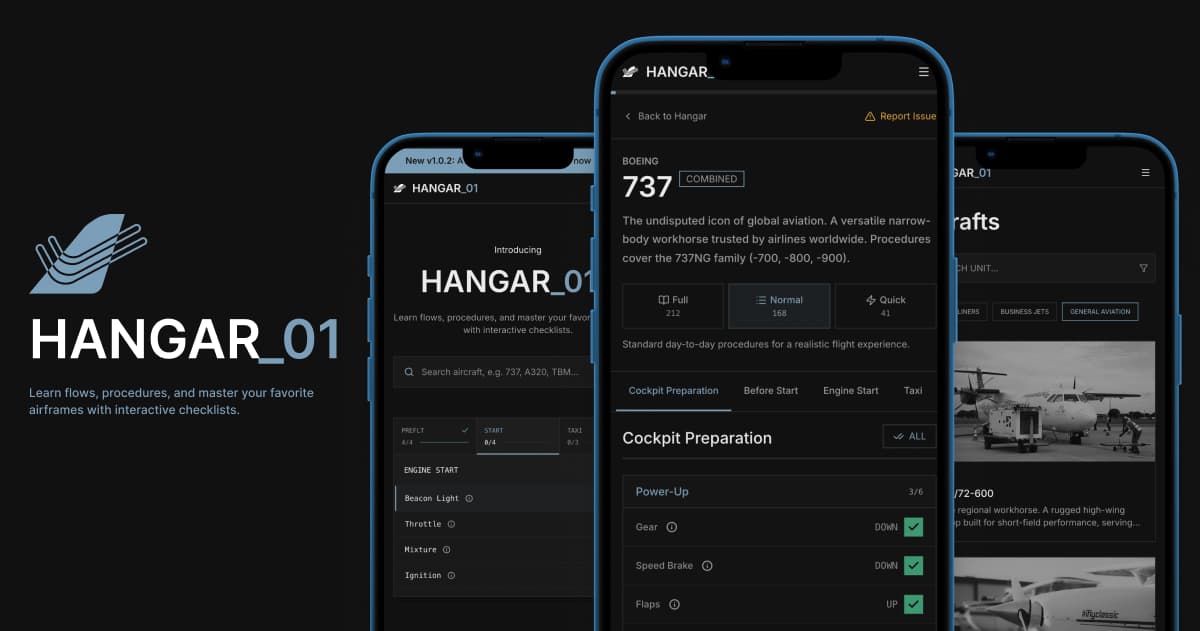
HANGAR01 v1 is live: a free browser app with interactive checklists for 15 aircraft, three modes, info bubbles and issue reports. It grew out of SimCheck.
Two years ago I posted a very early version of this project (then called SimCheck) on Reddit. It had three aircraft and a handful of checkboxes. The response was way more positive than I expected and it genuinely motivated me to keep going.
Then I stopped flight simming for a while but the itch to come back to this passion project was there and comeback I did.
What is HANGAR01?
Pronounced as _hangar-o-one_, the project builds on the spirit of its predecessor — it’s still a completely-free browser web app with interactive checklists for your favorite aircrafts.
But with a new coat of paint, more features, .. In fact, here’s all that is different.
Features of HANGAR01
- 15 aircraft at launch, from the humble Cessna 172 to the study-level Boeing 777.
- Three checklist modes — Quick, Normal, and Full. Quick gets you in the air with the absolute minimum. Normal is the satisfying core flow. Full is study-mode for when you want every switch.
- Info bubbles — short plain-English explanations of what an item does and where to find it in the cockpit. I added these because I kept forgetting where things were after time away.
- Built for phones — it feels great flipping switches with one hand while holding the checklist on another.
- NOTAMs — a feed of sim news and tutorials that I find interesting or relevant, plus announcements about the app.
- Report issues: This is a big one. The old app had no way to flag issues but this one does and I’ve tried to make it as simple and painless as possible. Checklist maintenance will be overhauled in the future to make it more of a community effort.
What’s in the Hangar?
At launch, the 3 checklist types are available for the following aircrafts:
- Cessna 172 Skyhawk — the default trainer
- Diamond DA62 — twin-engine GA
- Cessna 208 Caravan — turboprop utility
- Beechcraft King Air 350i — turboprop twin
- Daher TBM 930 — high-performance single turboprop
- HondaJet HA-420 — light jet with over-wing engines and Garmin G3000
- Citation CJ4 — light jet
- Citation Longitude — super-midsize jet
- Airbus A310-300 — classic widebody
- Airbus A320neo — narrowbody workhorse
- Airbus A330-900neo — long-haul widebody
- Boeing 737-800 — the most-flown airliner in the sim
- Boeing 747-8 — the Queen of the Skies
- Boeing 777-300ER — long-haul heavy
- Boeing 787-10 Dreamliner — composite widebody
More are in progress. The Airbus A380, ATR 42/72, and a few others are being worked on.
Design Philosophy
I love Airbus’ logic about how buttons only light up when they need attention and so I used that philosophy in the website, once you complete an item, it’s not “lit” anymore.
I used that same logic in HANGAR01. When you complete a checklist item, it dims. It doesn’t disappear — you can still see what you’ve done — but it stops competing for your attention.
At the same time I wanted to mimic the professional look of actual EFB software that many real professionals use. Whether I pulled that off is for you to judge.
The Checklist Engine
This is the core of the app and where most of the work went.
Each checklist is structured by phase of flight where items are grouped logically and you check them off as you go. Your progress is saved automatically to your device, so if you close the tab and come back, you’re right where you left off.
Each item also has an optional info bubble — a short plain-English note about what the item does and where to find it in the cockpit. I added these because sometimes I struggle to find where a particular switch is when I am learning a new airframe.
Tiered Checklists
Most checklist apps give you one list and for a lot of people (especially those learning), this can feel daunting and put you off from learning new aircrafts. So based on personal experience, I’ve split the checklists into three types: Quick, Normal, and Full.
- Quick is the bare minimum. Every item you’d need to not crash. If you just want to get airborne without thinking too hard, this is it.
- Normal is the satisfying core flow. Lights, signs, FMC programming, key system actions — the procedures that make a real pilot comfortable.
- Full is study mode. Every verify, every conditional, every set-and-forget switch. For when you want to go deep.
Your selected mode is saved per aircraft, so your 737 can stay on Normal while your TBM stays on Quick.
Reporting Errors
There is a report button on every checklist page. It slides up from the bottom, you describe the problem, submit, and it goes directly to me. Your draft is saved if you accidentally navigate away (though closing the browser tab will clear it). There’s an optional email field if your message requires a reply.
There are over 2,000 checklist items and at least some of them will be wrong, outdated, or imprecise. The report system is how I intend to keep the content accurate over time.
It will be overhauled and improved so the community can directly suggest changes but for now, this will have to suffice.
Installable PWA
HANGAR01 can be added to your home screen on iOS and Android. It’ll open full-screen like a native app. On iOS, tap Share → Add to Home Screen. On Android, tap the install prompt in your browser’s address bar.
I haven’t yet gotten MSFS 2024 and I realize it has nicer in-game checklists but I still prefer the physical feeling of holding a tablet (or phone) in my hand instead of using a virtual one in-game. It’s just my preference.
What’s next?
A lot of cool things on the horizon, some I have revealed, others I’ll keep under wraps for now.
If you have any questions or if you’re interested in sponsoring/pitching in for the relatively minor running costs, please reach out via the contact form. The site is free, no account needed, no ads.